
AI Event Segment Service Design
Contributions
User Interview
Past Event Review
Journey Map
Expert Review
Think-Aloud Protocol
Comprehension Check
Experience Prototyping
Role
UX Designer
Background
I was tasked with creating a presentation segment for an internal AI-focused event. The chosen topic was around emerging risks in the digital landscape, which required me to deliver the content in a way that was not only informative but also engaging and impactful for staff.
Being new to designing event experiences, I decided to approach this challenge using UX service design methods. Instead of preparing a traditional one-way presentation, I wanted to design the segment as a service experience—centered on staff needs, expectations, and learning outcomes.
Note: This case study has been simplified for sharing purposes. Sensitive information has been removed, and the focus here is to showcase my thought process rather than the specifics of the project.
Project Overview
My approach started with a simple question: “What do staff actually want and need from this session?”
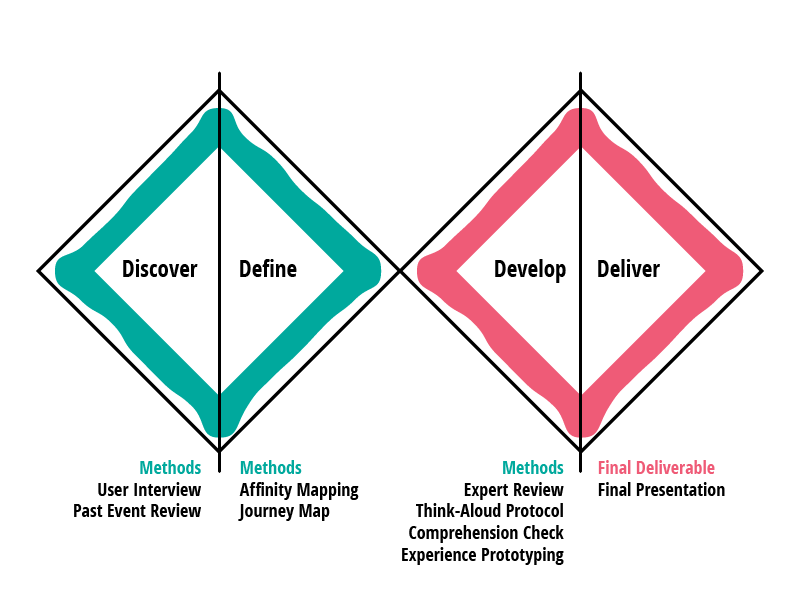
To answer this, I conducted interviews to understand their perspectives and reviewed past event feedback for patterns. From there, I applied a range of UX methods—such as expert review, think-aloud testing, comprehension checks, and prototyping the session flow—to shape the experience.
The goal was to design and test the end-to-end journey of the presentation, iterating along the way to refine content and delivery. The final outcome would be more than just slides; it would be a thoughtfully crafted experience that helped staff leave the session with greater awareness and actionable takeaways.
Project Flow
Research Objective
My first challenge was understanding what staff truly needed from this session. Instead of making assumptions, I approached it with the mindset to listen first, then design. The objective was to uncover their awareness, perceptions, and expectations so the session could be shaped around real needs. I guided my research with three simple questions: What do staff already know? Why does it matter to them? What would make this session valuable? For me, the research was less about collecting data and more about framing the experience through the users’ lens, ensuring the presentation would be relevant, engaging, and meaningful from the very start.
User Interview
I conducted short one-on-one interviews with five staff members from different backgrounds — operations, finance, marketing, project management, and sales. Although each conversation lasted only three to five minutes, the diversity of perspectives revealed different levels of awareness and expectations. This showed me that even brief interviews can uncover valuable insights, and it shaped my thought process: the session needed to be both accessible for those new to the topic and engaging for those already familiar, ensuring it resonated across the organization.
Interview Questions
1) Have you heard of deepfake phishing before?
If yes: How would you describe it in your own words?
If no: What do you think it might mean?
2) Do you think deepfake phishing could affect you—either personally or in your work?
3) If there were a presentation on deepfake phishing, what would make the session most useful or valuable for you?
Insights
Staff want to better understand what deepfake phishing is and, more importantly, how to recognize the red flags so they can avoid falling victim to attacks that could lead to personal financial loss or disruptions to the company’s systems.
1) Staff want to understand what deepfake phishing is.
2) Staff want to know how to spot red flags of deepfake phishing.
3) Staff want to avoid falling victim to attacks
Past Event Review
Looking at past event surveys, I noticed a recurring theme: sessions often felt too long, too heavy on theory, and too dry. What staff wanted instead were experiences that were practical, useful, and engaging — with demos, real-life applications, or even creative elements like skits and videos to bring the topic to life. They also valued breaks to stay focused. Topics that captured the most interest included Prompt engineering and practical applications.
This feedback shaped my thought process: if I wanted my segment to resonate, it couldn’t just deliver information — it had to be relevant, concise, and designed as an experience that staff could connect to and apply in their daily work.
Problem Statement
Staff need a clear and engaging way to understand deepfake phishing, since traditional theory-heavy sessions fail to connect or provide practical value.
Solution Statement
I believe that designing a concise, practical, and interactive session with real-world examples will equip staff to recognize and respond to deepfake phishing effectively.
Persona 1

“I’ve never heard of deepfake phishing before — can you explain it simply?”
A staff member new to the concept, needing clear and beginner-friendly guidance.
Goals
Understand what deepfake phishing is in plain language
Learn the common red flags and warning signs
Build confidence to recognize threats at work and personally
Pain Points
Easily overwhelmed by technical jargon
Struggles to connect theory to real-life situations
Feels lost in sessions that assume prior knowledge
Persona 2

“I don’t want a long lecture — just show me the red flags I can use in real life.”
A staff member with some awareness who values relevance, efficiency, and actionable tips
Goals
Quickly identify the key signs of deepfake phishing
See practical examples linked to work scenarios
Leave with simple, memorable takeaways
Pain Points
Finds sessions too theory-heavy or lengthy
Dislikes content without direct application to their role
Feels disengaged without demos or interactive elements
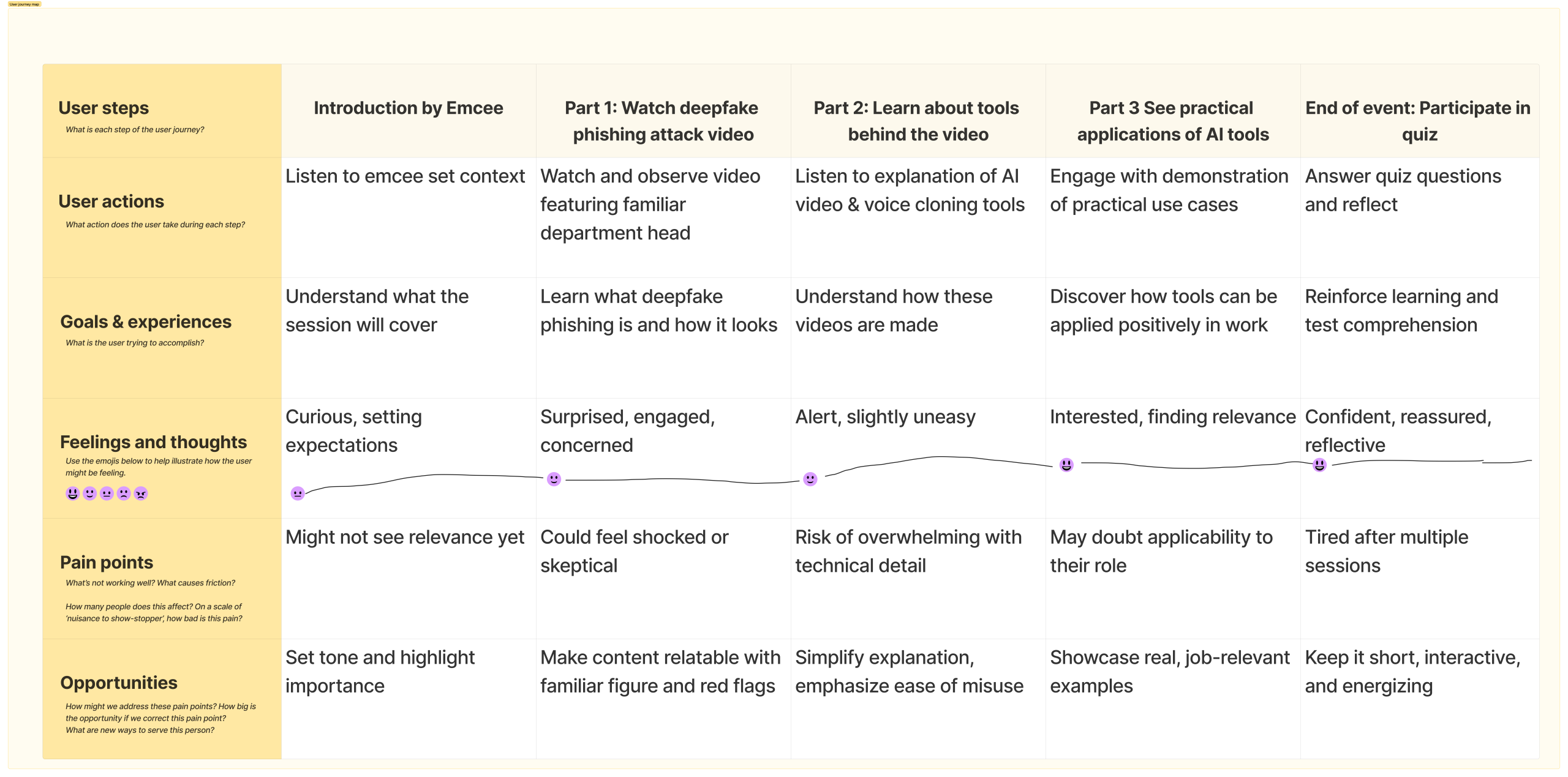
Journey Map
I designed the presentation as a journey to capture attention, build awareness, and provide practical takeaways. After a brief emcee introduction, I opened with a deepfake phishing attack video featuring a familiar department head. This not only explained the concept but also highlighted the red flags, making it real and relatable. I then revealed the tools behind it — AI-generated video and voice cloning — to show how easily such attacks can be created from everyday photos or voice clips, creating urgency and awareness. Shifting to a positive angle, I demonstrated how the same tools could be applied in day-to-day work, aligning with staff’s preference for practical, useful content. Finally, after all segments, we closed with a short quiz to reinforce key points and leave staff feeling engaged and confident.
Expert Review
Using the journey map as my guide, I created a draft set of presentation slides that outlined the flow of the segment. Each slide carried a rough explanation of what I planned to present — from the script for the deepfake phishing attack video, to the explanation of AI-generated video and voice cloning, and finally the type of demonstration I would use for practical applications. Rather than refining everything in isolation, I chose to conduct an expert review with the main event project managers and other presenters. My thought process was that by sharing an early draft, I could gather constructive feedback on clarity, flow, and alignment with the larger event. This not only helped me validate the direction of my segment but also ensured it complemented the other presentations, making the overall event more cohesive and impactful.
Feedback & Iteration (Expert Review)
From the expert review, I received valuable input on how to make the session more engaging and better aligned with the overall event. The project managers emphasized keeping the flow concise to fit within time constraints, while the other presenters suggested adding more interactive elements to re-energize the audience, since my segment would come later in the program. They also highlighted the importance of making the technical explanation of AI tools simpler and less intimidating so it would be accessible to everyone, regardless of background.
Reflecting on this feedback, I iterated on my slides and presentation flow: I trimmed down sections that were too detailed, introduced clearer visuals to support explanations, and added an interactive poll alongside the demonstration to maintain energy. My thought process was that each adjustment should not only respond to feedback but also strengthen the journey I had designed — keeping staff attentive, informed, and confident.
Rehearsal & Think-Aloud Testing
The rehearsal session was organized by the project manager, and I proposed using the think-aloud protocol to test all the segments together. Going into this session, I had already incorporated the feedback from the expert review into my slides, so this was an opportunity to validate those changes in a live setting. My thought process was that by asking presenters to share their thoughts out loud while experiencing each segment, we could uncover not only how well individual presentations worked but also how they flowed as a collective program. My presentation was one of the segments tested, giving me the chance to observe whether the adjustments I made — simplifying explanations, refining pacing, and adding interactive elements — improved clarity and engagement within the context of the entire event.
Feedback & Iteration (Rehearsal)
The rehearsal surfaced several important insights that shaped my next round of improvements. The deepfake phishing attack video was found to be engaging and surprising, but some participants noted they missed certain keywords. I realized that adding subtitles would make the red flags clearer and ensure the message was not lost. The voice cloning demonstration, where the audience could choose what they wanted to hear, was highlighted as fun and interactive — confirming that this activity effectively re-energized the session. However, the AI-video demonstration was seen as less useful, since it only showed how to generate a video from a photo. Reflecting on this, I decided to iterate by reframing the demo to showcase how a simple photo could be turned into a product video, making the application more practical and relevant. My thought process was to treat this feedback not as criticism, but as a way to sharpen the experience — ensuring each element of the presentation was not only engaging, but also clear, practical, and directly valuable to staff.
Experience Prototyping
After incorporating the changes from the earlier rehearsal, we moved into a full experience prototyping session at the actual venue, using the same equipment that would be used during the event. This was not just a test of content, but a rehearsal of the end-to-end experience. All presenters delivered their segments, including mine, in front of the invited department managers. My thought process was that by simulating the real environment as closely as possible, we could uncover practical issues with flow, timing, or technology that might not appear in smaller tests.
To strengthen the learning impact, we also piloted the end-of-event quiz using Slido as a comprehension check. This allowed us to test how well the audience retained key messages from each segment while also confirming the tool worked smoothly in a live setting. For me, this was an important step — not only validating the delivery of my segment, but ensuring that the whole event worked as a cohesive and engaging experience that left staff both informed and confident.
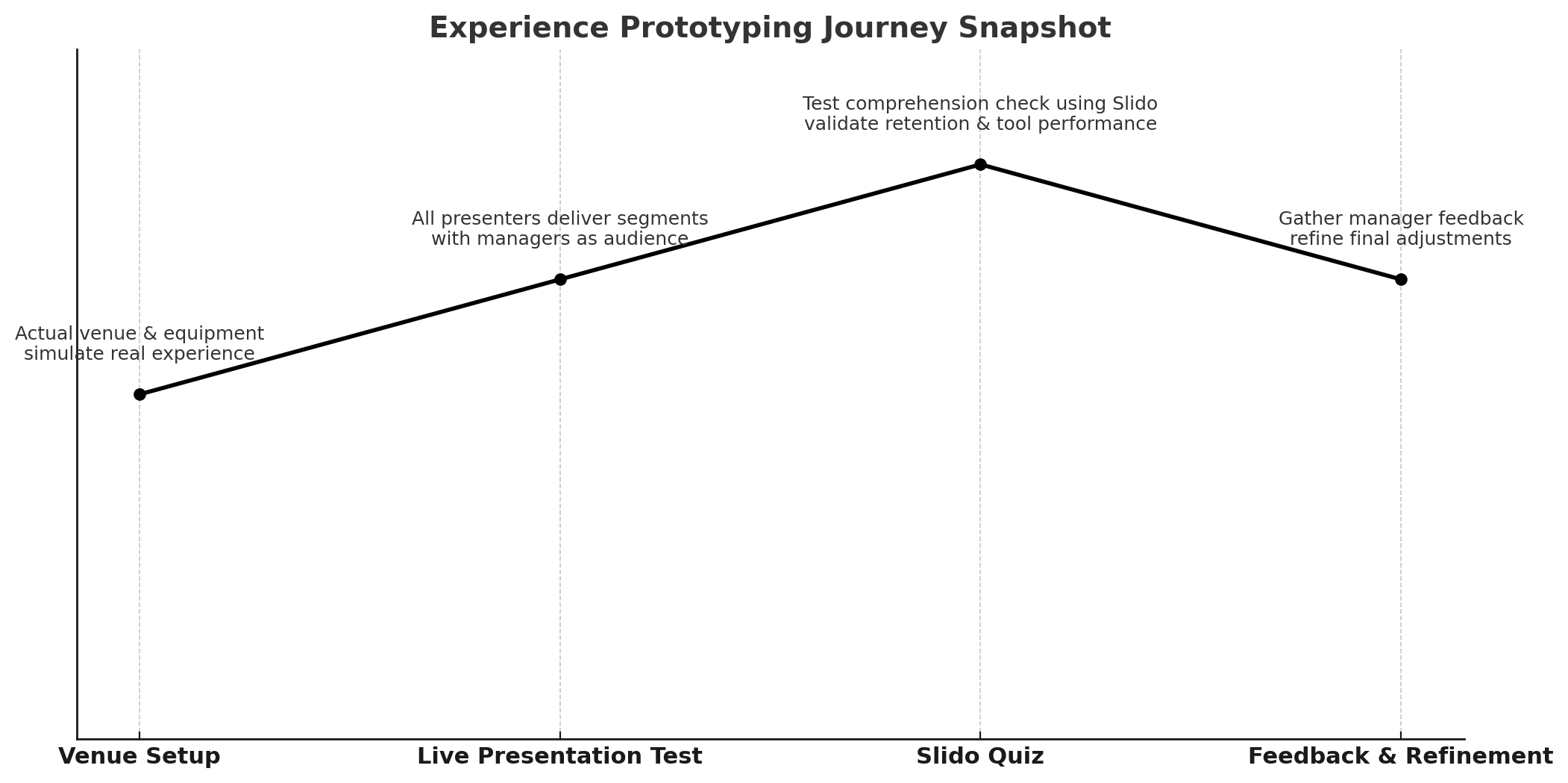
Feedback & Iteration (Experience Prototyping)
The full rehearsal with managers provided valuable final insights to fine-tune the experience. One issue raised was that the video subtitles were too low on the projected screen, making them hard to read. I decided to move the subtitles higher so they would remain visible to everyone in the room. The video sound was also louder than expected, overpowering the microphone audio, so I planned to reduce the volume to create a better balance. On a positive note, the overall pace of the presentation worked well — managers found it easy to follow, and many expressed genuine surprise at what AI can now do, which confirmed that the content was both clear and impactful.
For the Slido quiz, managers noted that the timer was too short, leaving little time to read and respond. When shown the same questions in Excel without time pressure, they answered correctly, which proved the questions were clear but the timing was off. This led me to extend the timer for each question to ensure comprehension could be tested fairly.
At this stage, my focus shifted from validating the design to perfecting the delivery. I saw this rehearsal as the moment to iron out small but critical details — positioning, sound, pacing, and timing — so that the final presentation would run seamlessly and allow the audience to stay fully engaged with the message.
Final Presentation
Due to a management decision, the actual event has been postponed to a later date. While this means the final delivery has not yet taken place, the process so far — from research and journey mapping, to prototyping, expert reviews, and rehearsals — has already provided valuable insights and learning. My thought process is to treat this postponement not as a setback, but as an opportunity: it gives me more time to refine the segment further, strengthen the flow, and ensure every detail is in place. I will complete this case study after the actual event, capturing both the live delivery and its impact on staff.
Key Takeaways
This project taught me the value of applying UX service design methods to something as intangible as an event presentation. By approaching it as a user journey, I was able to shift from simply “delivering content” to designing an experience that addressed staff needs and expectations.
The user interviews reminded me to listen first and design second, ensuring the session was both accessible for beginners and practical for those with prior awareness. Reviewing past event feedback highlighted the importance of keeping things concise, engaging, and relevant to daily work. Through expert reviews and rehearsals, I learned how critical iteration is — each round of feedback sharpened the clarity, flow, and impact of the segment. And finally, experience prototyping showed me that even small details, like subtitle placement or quiz timing, can make a big difference in audience engagement.
My biggest takeaway is that service design is about empathy and iteration. By seeing the presentation through the lens of staff experience, I designed not just slides, but a meaningful journey that helps people understand, engage, and apply what they learn.